
Hardware Abstraction Layer (HAL)
Hardware Abstraction Layer (HAL)
Cube HAL provides the confidential-computing runtime environment for Cube AI using Buildroot to create custom Linux images optimized for confidential computing.
This guide covers HAL image creation using Buildroot. For managing already-built HAL images and CVMs, see the CVM Management guide.
Overview
The HAL uses Buildroot to create a minimal Linux environment that includes:
- Linux kernel optimized for confidential computing
- Cube Agent for secure workload management
- Required runtime dependencies (Ollama, vLLM, etc.)
- Embedded certificates and configuration
- Support for Intel TDX and AMD SEV-SNP
Prerequisites
Before building HAL images, ensure you have:
- A Linux development machine with at least 20GB free disk space
- Build essentials (
build-essential,gcc,make, etc.) - Git for cloning repositories
- Sufficient RAM (8GB+ recommended for parallel builds)
Steps
1. Clone Repositories
Clone the Cube repository and the Buildroot repository:
git clone https://github.com/ultravioletrs/cube.git
git clone https://github.com/buildroot/buildroot.git
cd buildroot
git checkout 2025.08-rc3
2. Configure Buildroot for HAL Image
Buildroot configuration defines which packages, kernel options, and system settings are included in the final image. The HAL uses Buildroot's External Tree mechanism, where the cube-specific configurations are in cube/hal/linux.
Load HAL Configuration
Load the Cube HAL configuration using the BR2_EXTERNAL mechanism:
make BR2_EXTERNAL=../cube/hal/buildroot/linux cube_defconfigThis loads the pre-configured settings optimized for Cube confidential computing.
Customize Configuration (Optional)
To modify the configuration, use Buildroot's menu interface:
make menuconfigNavigate to Target packages → Cube packages → cube-agent to configure the Cube Agent settings:
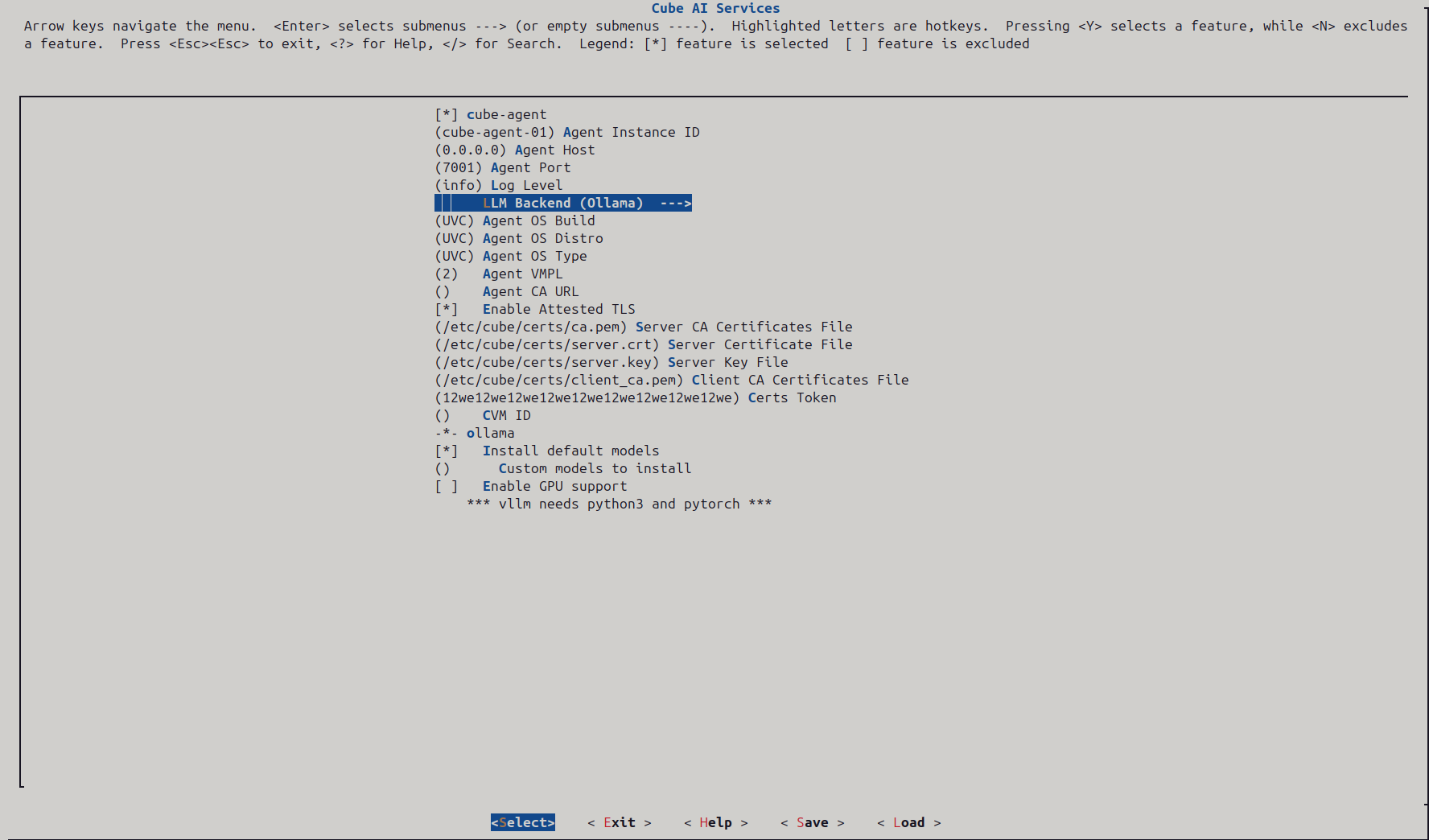 Cube Agent configuration in Buildroot menuconfig showing all available settings
Key Cube Agent Configuration Options:
- cube-agent - Enable the Cube Agent package (must be checked)
- Agent Instance ID - Unique identifier for this agent instance (e.g.,
cube-agent-01) - Agent Host - Network interface to bind to (typically
0.0.0.0for all interfaces) - Agent Port - Port for agent API (default:
7001) - Log Level - Logging verbosity:
debug,info,warn, orerror - LLM Backend - Choose between
OllamaorvLLMfor model inference - Agent OS Build - OS build identifier (e.g.,
UVC) - Agent OS Distro - Distribution name (e.g.,
UVC) - Agent OS Type - OS type identifier (e.g.,
UVC) - Agent VMPL - VM Privilege Level for SEV-SNP (typically
2) - Agent CA URL - URL of the Certificate Authority for obtaining certificates (leave empty if using pre-embedded certs)
- Enable Attested TLS - Enable mutual TLS with attestation (recommended for production)
- Certs Token - Authentication token for certificate operations (required if using CA URL)
- CVM ID - Confidential VM identifier (optional, auto-generated if empty)
Ollama Configuration:
- ollama - Ollama package dependency (automatically required when selected as LLM backend)
- Install default models - Current default models included are
tinyllama,starcoder2, andnomic-bert) - Custom models to install - Specify additional models to include (space-separated)
- Enable GPU support - Enable GPU acceleration (requires compatible hardware)
Important Notes:
- If Agent CA URL is configured, the agent will fetch certificates from the CA at runtime using the Certs Token for authentication
- If Agent CA URL is empty, certificates must be pre-embedded in the filesystem overlay at
/etc/cube/certs/ - The Certs Token is required when using a CA URL and should be treated as sensitive credential
- Certificate paths are baked into the image and measured as part of the attestation process
CA Configuration Details:
The agent integrates with Abstract Machines Certs Servicefor certificate management:
- CA Base URL:
http://<internal-ca-host> - CA Documentation: Docs
Save Configuration
After customizing, save the configuration on the interface and exit.
3. Build the Image
Start the Buildroot build process:
make -j$(nproc)Build Time: Expect ~1hr minutes for a full build depending on your system.
Output Files:
- Kernel:
output/images/bzImage - Root filesystem:
output/images/rootfs.ext4 - Firmware: OVMF files for UEFI boot
These files are used by the CVM management scripts to launch confidential VMs.
4. Deploy Built Images
Copy the built images to the expected locations:
sudo mkdir -p /etc/cube
sudo cp output/images/bzImage /etc/cube/
sudo cp output/images/rootfs.ext4 /etc/cube/
5. Boot and Run Cube AI Services
Once the images are deployed, use the CVM management scripts to launch a confidential VM and run the Cube AI stack.
See the CVM Management guide for:
- Starting CVMs with AMD SEV-SNP or Intel TDX
- Monitoring CVM health and status
- Accessing services via SSH and port forwarding
- Production deployment workflows
Next Steps
- Manage CVMs - Learn to start, monitor, and manage CVMs
- Upload Private Models - Add custom models to your CVM
- Test with Chat UI - Interact with models through the web interface