

Models
Cube AI exposes language models through a platform-wide models registry.
Models are managed at the platform level and are shared across domains. Domains do not own models, but can reference and use models that are available on the platform.
This endpoint allows clients to discover which models are available for inference within Cube AI.
Models in Cube AI are used by:
- Chat Completions
- Continue (VS Code integration)
- OpenCode
- Direct API-based inference
Cube AI scope
Cube AI acts as a secure model execution layer. It is responsible for model isolation, routing, and inference execution inside Trusted Execution Environments (TEEs). Cube AI does not define model architectures or training pipelines.
What Is a Model in Cube AI?
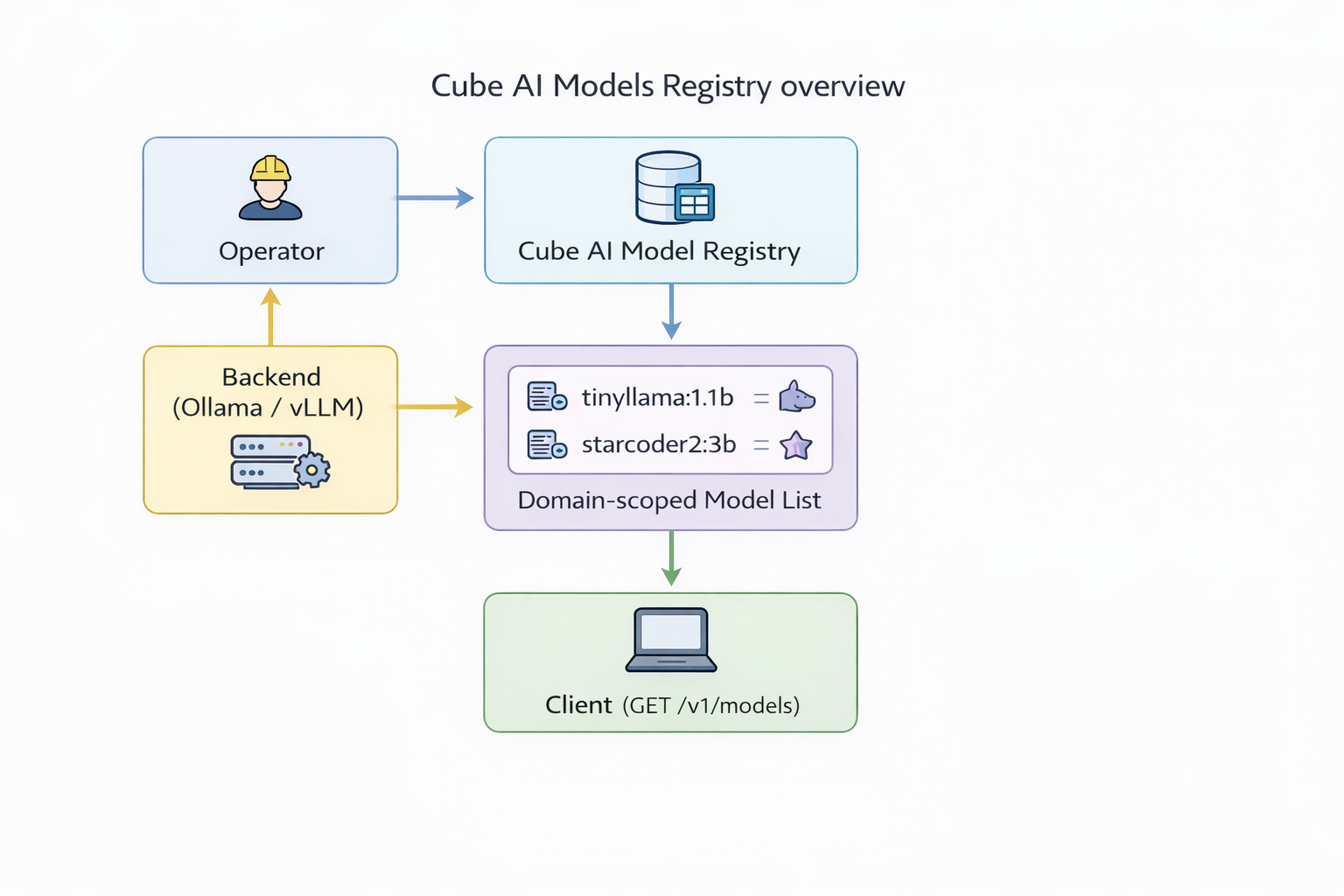
A model in Cube AI represents a deployable inference target exposed by the configured backend.
Models are platform-wide and are made available by a superadmin. Once registered, models can be used by any domain according to platform policies and permissions.
The available models depend on:
- Selected backend (Ollama or vLLM)
- Models that have been pulled, loaded, or registered by a superadmin
- Backend runtime configuration
Model Management
Models are added or removed by a superadmin.
Regular users and domains cannot register or modify models, but can list and use models that are available on the platform.
Backends
Ollama
When using Ollama as a backend, models are referenced by their Ollama identifiers
(e.g. tinyllama:1.1b, starcoder2:3b).
Models must be pulled into Ollama by a superadmin before they appear in Cube AI.
vLLM
When using vLLM, models correspond to server-side model deployments configured by a superadmin.
Model availability depends on the vLLM runtime configuration.
All requests are authenticated using Personal Access Tokens (PATs).
Endpoint
GET /proxy/{domain_id}/v1/modelsExample Request
curl -k https://localhost/proxy/<domain_id>/v1/models \
  -H "Authorization: Bearer <pat>"
Example Response
{
  "object": "list",
  "data": [
    {
      "id": "tinyllama:1.1b",
      "object": "model",
      "owned_by": "library"
    },
    {
      "id": "starcoder2:3b",
      "object": "model",
      "owned_by": "library"
    }
  ]
}
Notes
- Requests are authenticated using Personal Access Tokens (PATs)
- Models are platform-wide, not domain-specific
- Model identifiers are backend-specific (Ollama / vLLM)
- Models are added and removed by a superadmin
- Cube AI does not manage model training or fine-tuning
- All inference runs inside a Trusted Execution Environment (TEE)
Next Steps
- Use models with Chat Completions
- Connect models to Continue for VS Code
- Use models with OpenCode
- Explore Embeddings for semantic search workflows