

Audit Logs
Audit logs provide visibility into security-relevant and administrative actions performed within Cube AI. They help administrators and operators monitor activity, investigate issues, and support compliance and accountability requirements.
Audit Logs Overview
Audit logs record important events that occur within the Cube AI system, particularly those related to:
- User activity
- Domain-level changes
- Access control and security-sensitive operations
Audit logging is domain-scoped, meaning events are associated with the domain in which they occurred.
What Is Recorded
Depending on configuration and permissions, audit logs may include events such as:
- User login and logout activity
- Domain creation or deletion
- Changes to domain membership
- Role assignments or updates
- Administrative actions performed through the UI
- Security-related configuration changes
- Model interactions and inference requests
Each audit log entry typically captures:
- The type of action performed
- The user who performed the action
- The affected resource or domain
- A timestamp of when the action occurred
TEE Attestation and Attested mTLS Events
For model workloads running inside a Trusted Execution Environment (TEE), Cube AI establishes secure connections using attested mutual TLS (mTLS).
These secure interactions are recorded in audit logs and provide cryptographic traceability of confidential model execution.
The following events may be captured:
- Attested mTLS handshake between the Cube AI proxy and the TEE agent
- Verification of TEE attestation evidence
- Secure session establishment for LLM inference requests
All attested TLS handshakes are recorded as audit events.
These events include metadata about:
- TLS version
- Cipher suite
- Attestation verification status
- Attestation nonce
- Secure session metadata
Audit logs also allow viewing the attestation report associated with each verified TEE interaction.
These records provide verifiable evidence that model inference was executed within a trusted and integrity-verified execution environment.
Example: Attested LLM Request in Audit Logs
The Audit Logs page displays attestation status for each model interaction.
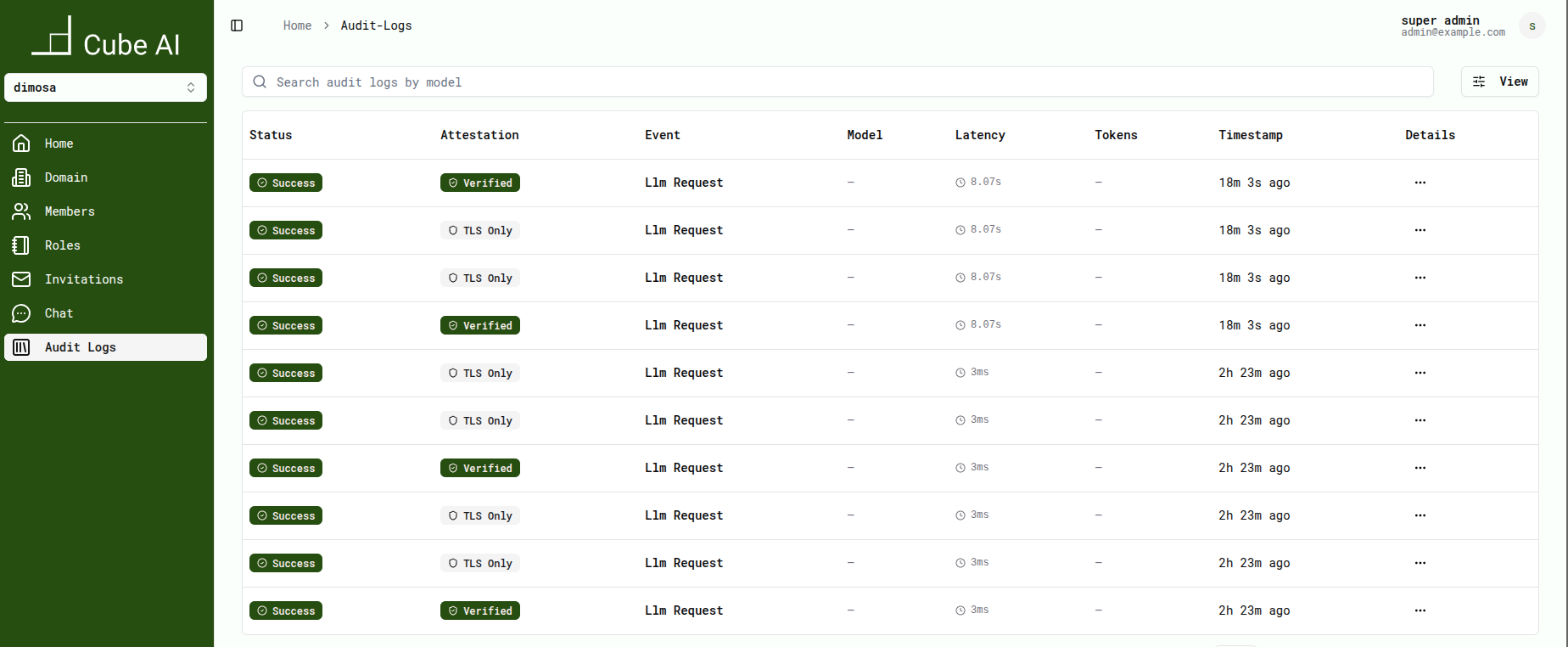
Selecting an event opens detailed attestation information, including secure handshake metadata and the attestation report.
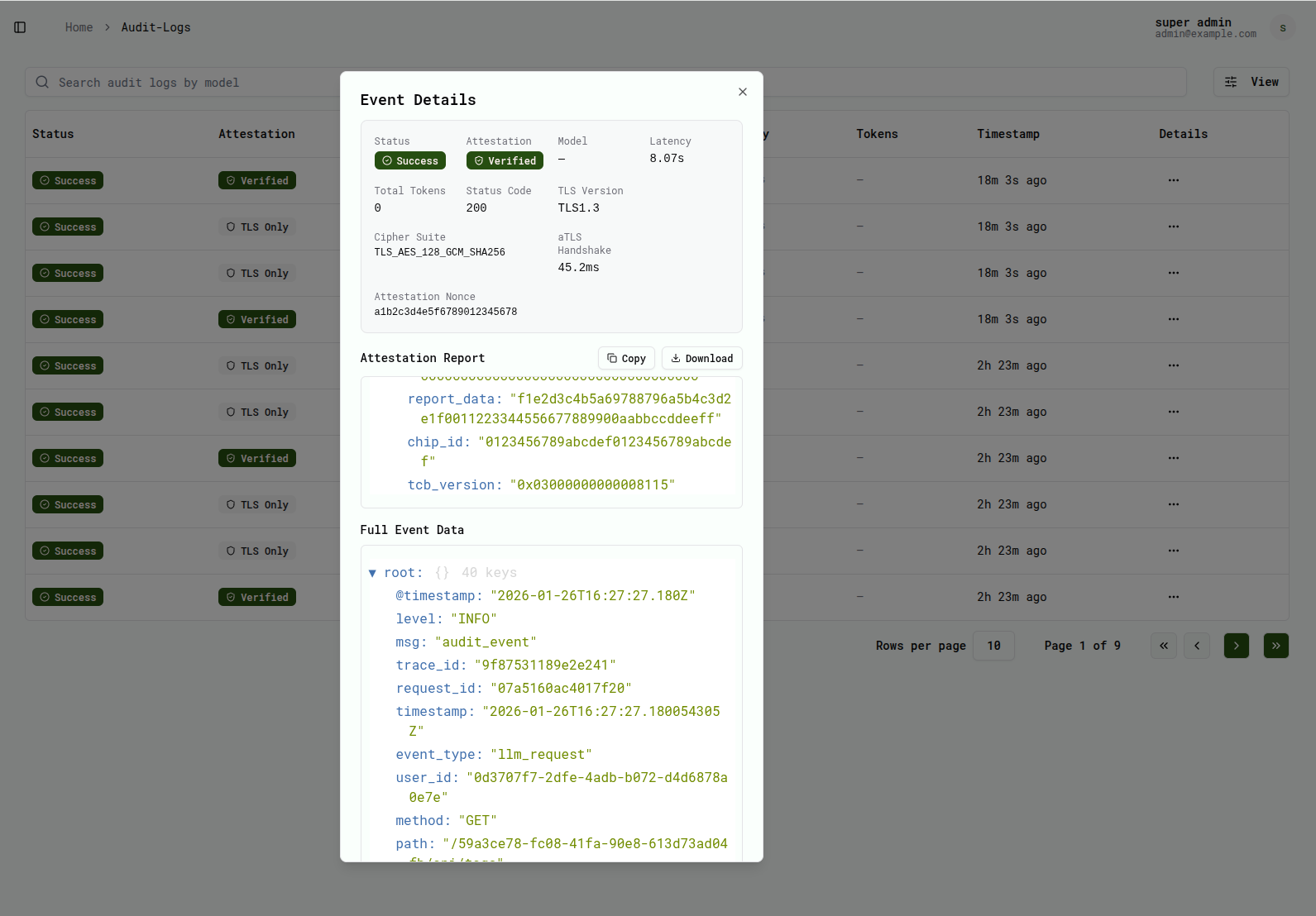
Accessing Audit Logs
Audit logs are accessible through the Cube AI UI to users with sufficient permissions.
Access to audit logs is restricted to authorized roles to ensure sensitive information is not exposed to unauthorized users.

Audit Logs in the UI
Audit logs are available from the Cube AI user interface within the context of an active domain.
Depending on system activity and configuration, the audit log table may initially appear empty until relevant events occur, such as:
- Model interactions (LLM requests)
- Role or membership changes
- Administrative or security-related actions
- TEE attestation and secure handshake events
This behavior is expected and does not indicate an error.
Using Audit Logs
Audit logs can be used to:
- Review recent administrative activity
- Investigate unexpected behavior or configuration changes
- Track access-related events
- Verify secure model execution within a TEE
- Support security reviews and incident analysis
Audit logs provide an immutable record of events and are intended for observability rather than real-time monitoring.
Audit Logs and Roles
Visibility into audit logs depends on the user’s role within a domain.
Typically:
- Administrative roles can view audit logs
- Standard users may not have access to audit information
For more details on role-based permissions, see:
👉 Security & Access → Roles and Access Control
Audit Logs and Domain Context
All audit log entries are associated with a specific domain.
When switching domains:
- The visible audit logs change accordingly
- Only events related to the active domain are shown
This ensures isolation and clarity when managing multiple domains.
Security and Compliance
Audit logging is a key component of Cube AI’s security posture.
By maintaining a record of critical actions, audit logs help:
- Detect misuse or misconfiguration
- Support forensic analysis
- Demonstrate accountability and operational transparency
- Provide traceability for confidential LLM workloads executed inside a TEE
Next Steps
To understand how permissions affect access to audit information, review:
👉 Security & Access → Roles and Access Control
For domain-level workflows, see:
👉 UI → Domains